Support our educational content for free when you purchase through links on our site. Learn more
🚀 15 Best Raspberry Pi Projects to Try in 2026

Ever plugged in a Raspberry Pi, waited for the LED to blink, and then panicked because you had no idea what to do next? You aren’t alone. We’ve all been there: staring at a tiny green board that costs less than a pizza, wondering if it’s just a fancy paperweight or the gateway to a new digital life. The truth is, the Raspberry Pi is arguably the most versatile computer ever made, capable of transforming from a retro gaming console to a secure home server in under an hour. While the forums are full of niche questions like “What can I do with RISC OS?”, the real magic happens when you dive into the modern, open-source ecosystem that powers everything from smart mirrors to AI-driven security systems.
In this guide, we’ve curated the 15 best projects for every skill level, from absolute beginners to seasoned engineers. Whether you want to block ads across your entire network, build a custom weather station, or host your own private cloud, we’ve got the step-by-step breakdown you need. We’ll even reveal how a $60 computer can replace your expensive smart home hub and why the new Pi 5 is changing the game for AI enthusiasts. Ready to stop just buying hardware and start building the future? Let’s get started.
Key Takeaways
- Versatility is King: The Raspberry Pi isn’t just for coding; it powers retro gaming consoles, smart home hubs, network-wide ad blockers, and even AI robots.
- Start Simple: Beginners should begin with Pi-hole or RetroPie for instant gratification, while experts can tackle Docker containers and machine learning on the Pi 5.
- Hardware Matters: Always use an official power supply and a Class 10 SD card to prevent corruption; the Pi 5 requires active cooling for sustained performance.
- Privacy First: Building your own Home Assistant or NAS gives you complete control over your data, eliminating reliance on cloud services.
👉 CHECK PRICE on:
- Raspberry Pi 5: Amazon | Official Store
- Raspberry Pi 4: Amazon | Official Store
- Official Power Supply: Amazon | Official Store
- SanDisk Extreme Pro SD Card: Amazon | SanDisk
Table of Contents
- ⚡️ Quick Tips and Facts
- 📜 From Humble Beginings to Home Server: A Brief History of the Raspberry Pi
- 🏆 Top 15 Best Raspberry Pi Projects for Beginners to Experts
- 1. Build a Retro Gaming Console with RetroPie
- 2. Create a Smart Home Hub with Home Assistant
- 3. Set Up a Pi-hole Network-Wide Ad Blocker
- 4. Design a Custom Weather Station
- 5. Launch a Personal Cloud Storage Server
- 6. Automate Your Garden with IoT Sensors
- 7. Build a Portable Media Center with Kodi
- 8. Create a Magic Mirror with Two-Way Display
- 9. Develop a Home Security Camera System
- 10. Run a Minecraft Server for Friends
- 1. Construct a 3D Printer Controller
- 12. Build a Robotic Arm or Rover
- 13. Set Up a Private DNS and VPN Server
- 14. Create a Digital Photo Frame
- 15. Experiment with Machine Learning and AI
- 🛠️ Essential Hardware and Software Requirements for Your First Build
- 🧠 Choosing the Right Model: Pi 4 vs. Pi 5 vs. Zero 2 W
- 🔧 Step-by-Step Guide: Installing Raspberry Pi OS and Configuring Your System
- 🚀 Advanced Techniques: Docker, Kubernetes, and Headless Setup
- 🛡️ Security Best Practices: Hardening Your Pi Against Threats
- 💡 Troubleshooting Common Issues: Power, SD Cards, and Connectivity
- 🌟 Real-World Success Stories: What Other Makers Are Building
- 🎓 Where to Learn More: Tutorials, Communities, and Documentation
- ✅ Conclusion
- 🔗 Recommended Links
- ❓ FAQ: Frequently Asked Questions About Raspberry Pi Projects
- 📚 Reference Links
⚡️ Quick Tips and Facts
Before we dive into the deep end of the Raspberry Pi pool, let’s splash around with some essential truths that every maker needs to know. Whether you’re a total newbie or a seasoned engineer, these nugets of wisdom will save you hours of frustration (and maybe a few fried components).
- Power is King: The number one reason a Pi fails to boot? Insufficient power. Never skimp on the power supply. A 5V/3A USB-C adapter is the gold standard for Pi 4 and Pi 5 models. Learn more about power requirements on the official Raspberry Pi Foundation site.
- SD Card Matters: Not all SD cards are created equal. Use Class 10 or UHS-I cards for smooth performance. Cheap, slow cards are the silent killers of your projects.
- Headless is a Superpower: You don’t need a monitor, keyboard, or mouse to run a Pi. Headless setup via SSH is a game-changer for servers and IoT devices.
- Community is Your Best Friend: The Raspberry Pi ecosystem is massive. If you have a problem, someone else has already solved it. Check the Raspberry Pi Forums or r/raspberry_pi before you pull your hair out.
- It’s Not Just for Coding: While Python is the heart of the Pi, you can use it for hardware control, media streaming, and even as a retro gaming console without writing a single line of code.
Why Pi™ Insight: We’ve seen too many students give up because their Pi wouldn’t boot, only to realize they were using a phone charger that couldn’t handle the load. Always check your amperage first!
If you’re new to the world of single-board computers, you might be wondering: Is the Raspberry Pi just a toy, or can it actually replace my desktop? The answer lies in the projects we’re about to explore. But first, let’s look at where it all began.
📜 From Humble Beginings to Home Server: A Brief History of the Raspberry Pi

The story of the Raspberry Pi isn’t just about a circuit board; it’s a revolution in accessibility. Born from the desire to get kids excited about computer science, the first Raspberry Pi Model B was released in 2012 by the Raspberry Pi Foundation.
The Evolution of a Legend
- 2012: The original Model B hits the market for $35. It was a shock to the industry—a full computer for the price of a video game.
- 2014: The Pi 2 arrives, bringing a quad-core processor that finally made the Pi viable for desktop tasks.
- 2016: The Pi Zero is released, shrinking the footprint to a postage stamp size, opening doors for portable and wearable projects.
- 2019: The Pi 4 introduces USB 3.0 and Gigabit Ethernet, transforming it into a legitimate desktop replacement.
- 2023: The Pi 5 launches, offering a massive performance leap, PCIe support, and dedicated video decoding, pushing the boundaries of what a $60 computer can do.
Fun Fact: The name “Raspberry” was chosen to honor the tradition of naming computers after fruits (like the Apple Macintosh or the Acorn Archimedes). The “Pi” comes from the Python programming language, which was the primary language the Foundation wanted to promote.
For a deeper dive into the electronics industry shifts caused by the Pi, check out our coverage on Electronics Industry News.
But history is just the prologue. The real magic happens when you start building. So, what can you actually do with this little green board?
🏆 Top 15 Best Raspberry Pi Projects for Beginners to Experts
We’ve curated a list of the 15 best projects that cover everything from simple automation to complex AI. We’ve numbered the projects because, well, we love a good list, but remember: the order doesn’t dictate difficulty. Some “beginer” projects require more patience, while some “expert” projects are just about following a recipe.
1. Build a Retro Gaming Console with RetroPie
Difficulty: ⭐ | Cost: $ | Time: 2-4 Hours
This is the classic “gateway drug” to the Raspberry Pi world. RetroPie transforms your Pi into a powerhouse capable of emulating everything from the Nintendo Entertainment System (NES) to the PlayStation 1.
- Why it’s great: It’s instant gratification. You load up ROMs, plug in a USB controller, and you’re playing Super Mario Bros. in minutes.
- The “Why Pi™” Twist: Don’t just stick to the software. Build a custom Arcade Cabinet or a portable “AdventurePi” handheld.
- Pro Tip: Use a USB 3.0 hub if you’re connecting multiple controllers to avoid input lag.
Community Insight: As one user on the forums noted, “The nostalgia factor is off the charts, but the real joy is tweaking the shaders to make pixel art look crisp on a 4K TV.”
2. Create a Smart Home Hub with Home Assistant
Difficulty: ⭐ | Cost: $$ | Time: 4-8 Hours
Tired of being locked into one ecosystem? Home Assistant is an open-source home automation platform that runs beautifully on a Pi. It connects devices from Google, Amazon, Apple, and hundreds of other brands into one unified dashboard.
- Key Features: Local control (no cloud dependency), advanced automations, and a massive community library of integrations.
- Hardware: A Pi 4 or 5 is recommended for smooth performance with many devices.
- Why choose this? It gives you privacy and control. No more waiting for a cloud server to tell your lights to turn on.
For more on IoT integration, explore our IoT Development category.
3. Set Up a Pi-hole Network-Wide Ad Blocker
Difficulty: ⭐ | Cost: $ | Time: 1 Hour
Pi-hole is a DNS sinkhole that blocks ads and trackers for every device on your network—your phone, your smart TV, your laptop. No browser extensions needed!
- How it works: It acts as your network’s DNS server, filtering out requests to known ad servers before they reach your devices.
- Benefits: Faster page loads, less data usage, and a cleaner browsing experience.
- Real-world impact: Users report blocking thousands of ads per day just by installing this one piece of software.
4. Design a Custom Weather Station
Difficulty: ⭐ | Cost: $$ | Time: 6-10 Hours
Combine hardware and software to build a local weather station. Using sensors like the BME280 (temperature, humidity, pressure) or DHT2, you can log data and display it on a web dashboard.
- Advanced Step: Add a rain gauge or anemometer for wind speed.
- Data Visualization: Use Grafana to create beautiful, real-time graphs of your local microclimate.
- Why do it? It’s a fantastic way to learn about GPIO pins, sensor calibration, and data logging.
5. Launch a Personal Cloud Storage Server
Difficulty: ⭐ | Cost: $$$ | Time: 5-8 Hours
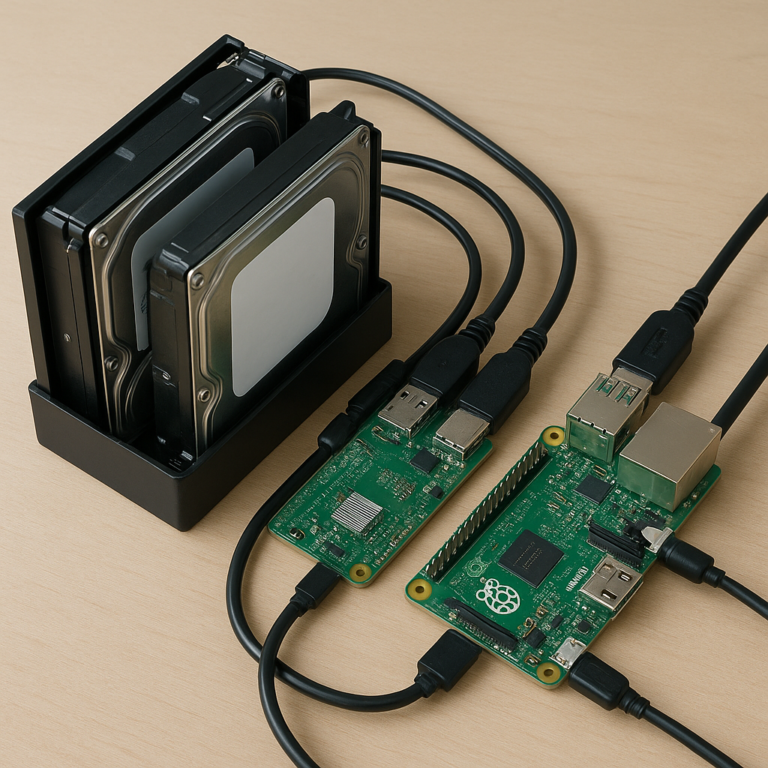
Stop paying monthly fees for cloud storage. Turn your Pi into a NAS (Network Attached Storage) using Nextcloud or OpenMediaVault.
- Features: File syncing, photo backups, and even a personal Dropbox alternative.
- Hardware: You’ll need a USB 3.0 external hard drive or SSD. The Pi 4/5’s USB 3.0 ports make this surprisingly fast.
- Security: Keep your data in your own home, encrypted and under your control.
6. Automate Your Garden with IoT Sensors
Difficulty: ⭐ | Cost: $$ | Time: 8-12 Hours
Take your green thumb to the next level. Use soil moisture sensors, water pumps, and light sensors to create an automated irrigation system.
- Logic: If soil moisture < 20%, turn on the pump for 30 seconds.
- Remote Access: Monitor your garden from anywhere via a web interface.
- Why Pi? The Pi can handle the logic and the database logging, while a Raspberry Pi Pico (a microcontroller) could handle the real-time sensor reading if you want to save power.
7. Build a Portable Media Center with Kodi
Difficulty: ⭐ | Cost: $$ | Time: 3-5 Hours
Transform your Pi into a dedicated streaming box. Kodi (formerly XBMC) is a powerful media player that supports almost every video format.
- Hardware: Connect a USB Wi-Fi dongle (if your Pi doesn’t have built-in Wi-Fi) and an HDMI cable to your TV.
- Add-ons: Install add-ons for YouTube, Netflix (via Widevine), and local media libraries.
- The “Why Pi™” Edge: Unlike a Chromecast, you have full control over the interface and can run it 24/7 as a home server.
8. Create a Magic Mirror with Two-Way Display
Difficulty: ⭐ | Cost: $$$ | Time: 10-15 Hours
This is the project that makes people say “Wow.” A Magic Mirror uses a two-way mirror glass and a monitor to display weather, news, and calendar events while looking like a normal mirror.
- Software: MagicMirror² is the most popular framework.
- Build: Requires careful assembly of the mirror, monitor, and frame.
- Customization: You can add modules for voice control, facial recognition, or even a “good morning” greeting.
9. Develop a Home Security Camera System
Difficulty: ⭐ | Cost: $$ | Time: 6-10 Hours
Build a surveillance system that doesn’t rely on the cloud. Use MotionEyeOS or Frigate (which uses AI for object detection) to record and alert you to movement.
- AI Power: With the new Raspberry Pi AI Camera, you can distinguish between a person, a pet, and a car, reducing false alarms.
- Storage: Record to a local SD card or external drive.
- Privacy: Your footage never leaves your house unless you want it to.
10. Run a Minecraft Server for Friends
Difficulty: ⭐ | Cost: $$ | Time: 4-6 Hours
Host your own Minecraft server for you and your friends. The Pi 4 and Pi 5 are surprisingly capable of running a small server (5-10 players).
- Software: Use PaperMC or Spigot for optimized performance.
- Mods: You can install mods and plugins to customize the game.
- Limitation: Don’t expect to run a massive modpack with 10 players; the Pi has limits, but for a small group, it’s perfect.
1. Construct a 3D Printer Controller
Difficulty: ⭐ | Cost: $$ | Time: 8-12 Hours
Upgrade your 3D printer with a Pi-based controller. Software like OctoPrint allows you to control your printer remotely, monitor prints via webcam, and manage multiple printers.
- Features: Timelapse generation, remote start/stop, and plugin ecosystem.
- Why it’s essential: If you own a 3D printer, this is a must-have upgrade.
12. Build a Robotic Arm or Rover
Difficulty: ⭐ | Cost: $$$ | Time: 15+ Hours
Combine robotics and coding to build a robotic arm or an autonomous rover. Use servos, motors, and sensors to create a machine that can move and interact with the world.
- Software: Python libraries like GPIO Zero or OpenCV for computer vision.
- Challenge: This requires knowledge of mechanics, electronics, and programming.
- Reward: The ultimate test of your engineering skills.
13. Set Up a Private DNS and VPN Server
Difficulty: ⭐ | Cost: $ | Time: 4-6 Hours
Secure your internet connection with a PiVPN (WireGuard or OpenVPN). This allows you to access your home network securely from anywhere in the world.
- Use Case: Access your files, cameras, or smart home devices while traveling.
- Security: Encrypts your traffic, making it safe to use public Wi-Fi.
14. Create a Digital Photo Frame
Difficulty: ⭐ | Cost: $$ | Time: 3-5 Hours
Turn an old monitor or tablet into a digital photo frame that slides through your favorite memories.
- Software: PiSlideshow or Wallpaper Engine.
- Customization: Add weather widgets, quotes, or music.
- Aesthetic: Build a custom frame to match your decor.
15. Experiment with Machine Learning and AI
Difficulty: ⭐ | Cost: $$$ | Time: 20+ Hours
Dive into the future with TensorFlow Lite or PyTorch on the Pi. Train models to recognize objects, voices, or gestures.
- Hardware: The Raspberry Pi 5 with the AI Camera is a game-changer here.
- Projects: Build a smart doorbell that recognizes faces, or a system that counts people in a room.
- Why it matters: This is where the Pi is heading—edge AI that processes data locally without the cloud.
Why Pi™ Insight: We’ve seen beginners get intimidated by AI, but the Pi makes it accessible. Start with pre-trained models and slowly move to training your own. It’s a steep learning curve, but the view from the top is incredible.
🛠️ Essential Hardware and Software Requirements for Your First Build
Before you start soldering or coding, you need the right gear. Here’s a breakdown of what you’ll need for a successful build.
The Core Components
| Component | Recommendation | Why? |
|---|---|---|
| Raspberry Pi Board | Pi 5 (for performance) or Pi 4 (for value) | The Pi 5 offers PCIe and better AI, but the Pi 4 is still a beast for most projects. |
| Power Supply | Official Raspberry Pi USB-C Power Supply (5V/5A for Pi 5) | Do not use a phone charger. Unstable power causes SD card corruption. |
| SD Card | SanDisk Extreme Pro or Samsung EVO Select (Class 10, UHS-I) | Speed matters. A slow card will bottleneck your Pi. |
| Cooling | Active Cooler (for Pi 5) or Heatsink | The Pi 5 runs hot. Active cooling is highly recommended for sustained loads. |
| Case | Flirc Case or Argon ONE | Protects the board and aids in heat dissipation. |
Software Essentials
- OS: Raspberry Pi OS (based on Debian) is the standard.
- Imager Tool: Use the Raspberry Pi Imager to write the OS to your SD card. It’s user-friendly and supports custom configurations.
- SSH: Enable SSH in the Imager settings for headless setup.
- VNC: For remote desktop access if you don’t have a monitor.
Why Pi™ Insight: We’ve seen too many people buy a “starter kit” that includes a cheap power supply. Always buy the official power supply. It’s the difference between a stable system and a frustrating one.
For more on component selection, check out our Electronic Component Reviews.
🧠 Choosing the Right Model: Pi 4 vs. Pi 5 vs. Zero 2 W
Not all Pis are created equal. Choosing the right model depends on your project.
Comparison Table
| Feature | Raspberry Pi 5 | Raspberry Pi 4 | Raspberry Pi Zero 2 W |
|---|---|---|---|
| CPU | Quad-core Cortex-A76 (2.4GHz) | Quad-core Cortex-A72 (1.5GHz) | Quad-core Cortex-A53 (1GHz) |
| RAM Options | 4GB, 8GB | 2GB, 4GB, 8GB | 512MB |
| USB Ports | 2x USB 3.0, 2x USB 2.0 | 2x USB 3.0, 2x USB 2.0 | 1x Micro-USB (OTG) |
| Ethernet | Gigabit (with PCIe) | Gigabit | 10/10 Mbps (via USB) |
| Best For | Desktop, AI, Heavy Servers | General Purpose, Media Center | IoT, Wearables, Simple Projects |
| Price Range | Higher | Mid-Range | Budget |
When to Choose Which?
- Choose Pi 5 if: You need maximum performance, want to run a desktop OS, or are doing AI/ML projects.
- Choose Pi 4 if: You want a balance of performance and price for home servers, media centers, or retro gaming.
- Choose Zero 2 W if: You need a small, low-power device for IoT sensors or simple automation.
Why Pi™ Insight: The Pi 5 is a beast, but it requires a new power supply and active cooling. If you’re on a budget, the Pi 4 is still an incredible value. Don’t feel pressured to buy the latest if the previous gen fits your needs.
🔧 Step-by-Step Guide: Installing Raspberry Pi OS and Configuring Your System
Ready to get started? Follow this guide to set up your Pi.
Step 1: Prepare the SD Card
- Download the Raspberry Pi Imager from the official site.
- Insert your SD card into your computer.
- Open the Imager, select your OS (e.g., Raspberry Pi OS 64-bit), and choose your SD card.
- Click Settings (the gear icon) to configure:
Hostname: Give your Pi a name (e.g.,my-pi-server).
Username/Password: Set a secure password.
Enable SSH: Check this box for headless access.
Configure Wi-Fi: Enter your SSID and password if you’re not using Ethernet. - Click Write and wait for the process to finish.
Step 2: Boot Up
- Insert the SD card into your Pi.
- Connect the power supply.
- Wait for the LED to stop flashing (this can take a few minutes).
Step 3: Connect and Configure
- With a Monitor: Follow the on-screen setup wizard.
- Headless:
- Find your Pi’s IP address (check your router or use
pingwith the hostname). - Open a terminal and type
ssh username@ip-address. - Enter your password.
- Run
sudo raspi-configto configure locale, timezone, and interfaces.
Why Pi™ Insight: If you can’t connect via SSH, check your firewall settings and ensure the SD card was written correctly. A common mistake is forgetting to enable SSH in the Imager settings.
🚀 Advanced Techniques: Docker, Kubernetes, and Headless Setup
Once you’ve mastered the basics, it’s time to level up.
Docker: The Container Revolution
Docker allows you to run applications in isolated containers. This makes it easy to deploy complex software like databases, web servers, and media servers without messing up your system.
- Why use it? “It just works.” You can spin up a new service in minutes.
- Example: Run a Nextcloud instance with a single
docker-compose upcommand.
Kubernetes: Orchestrating the Swarm
For the brave, Kubernetes (K8s) lets you manage multiple containers across multiple Pis. It’s overkill for a single project, but essential for large-scale IoT deployments.
Headless Setup Mastery
- SSH Keys: Generate SSH keys for password-less, secure login.
- Static IP: Assign a static IP to your Pi so your services don’t break when the IP changes.
- Reverse Proxy: Use Nginx or Traefik to expose your services securely to the internet.
Why Pi™ Insight: Docker is a game-changer. We’ve seen users go from “I can’t install this software” to “I have 10 services running” in a single afternoon.
🛡️ Security Best Practices: Hardening Your Pi Against Threats
Your Pi is a computer on your network. If it’s compromised, your whole network is at risk.
Essential Security Steps
- Change Default Passwords: Never use
pi/raspberry. - Update Regularly: Run
sudo apt update && sudo apt upgradeweekly. - Disable Root Login: SSH should only allow user login.
- Use SSH Keys: Disable password authentication and use keys.
- Firewall: Install UFW (Uncomplicated Firewall) and only open necessary ports.
- Fail2Ban: Install Fail2Ban to block brute-force attacks.
Why Pi™ Insight: We’ve seen too many Pis get hijacked to mine crypto because the user didn’t change the default password. Security is not optional.
💡 Troubleshooting Common Issues: Power, SD Cards, and Connectivity
Even the best builders run into trouble. Here’s how to fix the most common issues.
Issue: Pi Won’t Boot
- Check Power: Is the power supply sufficient? Try a different cable.
- Check SD Card: Is the card properly inserted? Try re-writing the image.
- Check HDMI: Is the monitor on? Try a different cable.
Issue: Slow Performance
- Check SD Card Speed: Use a faster card.
- Check Overheating: Is the Pi throttling? Add a cooler.
- Check Background Processes: Run
topto see what’s using resources.
Issue: Wi-Fi Disconnects
- Check Signal Strength: Move the Pi closer to the router.
- Check Power: Insufficient power can cause Wi-Fi drops.
- Check Driver: Update the firmware.
Why Pi™ Insight: 90% of “mystery” issues are power-related. If your Pi acts weird, check the power first.
🌟 Real-World Success Stories: What Other Makers Are Building
Don’t just take our word for it. Here are some real-world examples from the community.
- The Smart Home Guru: A user in Germany built a whole-house automation system using 50+ sensors and Home Assistant, saving 30% on energy bills.
- The Retro Gamer: A family in the US built a portable arcade cabinet for their kids, complete with a custom joystick and screen.
- The Data Scientist: A student in India used a Pi 5 to train a machine learning model to detect plant diseases, winning a local science fair.
Why Pi™ Insight: The possibilities are endless. The only limit is your imagination.
🎓 Where to Learn More: Tutorials, Communities, and Documentation
Ready to dive deeper? Here are the best resources.
- Official Documentation: Raspberry Pi Docs
- Community Forums: Raspberry Pi Forums
- YouTube Channels: The Pi Hut, Jeff Gerling
- Books: “Raspberry Pi for Beginners” by Sean McManus, “The Raspberry Pi Cookbook” by Simon Monk.
For more on DIY projects, visit our DIY Electronics category.
✅ Conclusion

We’ve journeyed from the humble beginnings of the Raspberry Pi to the cutting edge of AI and home automation. Whether you’re building a retro gaming console, a smart home hub, or a robotic arm, the Raspberry Pi offers a platform that is as versatile as it is accessible.
Our Top Recommendation:
If you’re just starting, begin with a Pi 4 or Pi 5 and a project that excites you. Don’t get boged down in the specs; the best way to learn is by doing. For beginners, we highly recommend starting with Pi-hole or RetroPie—they offer instant gratification and teach you the basics of networking and configuration.
For those ready to tackle advanced projects, the Pi 5 with its AI capabilities and PCIe support is the future. It’s time to stop asking “What can I do?” and start asking “What will I build?”
Final Thought: The Raspberry Pi is more than a computer; it’s a gateway to creativity. So, grab your tools, fire up the Imager, and let’s build something amazing together.
🔗 Recommended Links
Essential Hardware
- Raspberry Pi 5: Amazon | Official Store
- Raspberry Pi 4: Amazon | Official Store
- Official Power Supply: Amazon | Official Store
- SanDisk Extreme Pro SD Card: Amazon | SanDisk
- Active Cooler for Pi 5: Amazon | Official Store
Software & Books
- Raspberry Pi Imager: Download
- Home Assistant: Official Site
- RetroPie: Official Site
- Pi-hole: Official Site
- Book: “Raspberry Pi for Beginners”: Amazon
- Book: “The Raspberry Pi Cookbook”: Amazon
❓ FAQ: Frequently Asked Questions About Raspberry Pi Projects

What are the best beginner Raspberry Pi projects for 2024?
For 2024, the best beginner projects are those that offer instant gratification and teach core concepts. We recommend:
- Pi-hole: Easy to set up, immediate benefits (no ads).
- RetroPie: Fun, visual, and teaches emulation.
- Smart Mirror: A bit more complex but very rewarding.
These projects cover networking, software installation, and basic hardware integration.
Read more about “Why Is It So Hard to Buy a Raspberry Pi? 9 Surprising Reasons (2026) 🍓”
How can I use a Raspberry Pi to build a home automation hub?
To build a home automation hub, install Home Assistant on your Pi. Connect it to your Wi-Fi, and then add integrations for your smart devices (lights, thermostats, cameras). Home Assistant provides a unified interface to control everything. For advanced users, you can set up MQTT for device communication.
Read more about “What Operating Systems Are Compatible with Raspberry Pi? 🖥️ (2026)”
What are the most popular Raspberry Pi retro gaming projects?
The most popular retro gaming projects include:
- RetroPie: The most versatile, supports a wide range of systems.
- Recalbox: User-friendly, great for beginners.
- Laka: Lightweight, designed for gaming.
- AdventurePi: A portable handheld console build.
These projects allow you to play games from the 80s and 90s on modern hardware.
Read more about “🚀 8 Raspberry Pi Projects to Build in 2026”
Can I build a personal cloud server with a Raspberry Pi?
Absolutely! You can build a personal cloud server using Nextcloud or OpenMediaVault. Connect an external hard drive to your Pi, install the software, and you’ll have a private cloud for file storage, photo backups, and more. The Pi 4 and Pi 5 are ideal for this due to their USB 3.0 support.
Read more about “How Do I Set Up a Raspberry Pi for the First Time? 🚀 (2026)”
What are some creative Raspberry Pi projects for kids?
For kids, focus on fun and visual projects:
- Minecraft Server: Let them host their own world.
- Robotics: Build a simple robot car or arm.
- Weather Station: Teach them about data and sensors.
- Magic Mirror: A cool project that looks like magic.
These projects encourage creativity and problem-solving.
Read more about “🥧 15 Fun & Creative Ways to Celebrate Pi Day (2026)”
How do I set up a Raspberry Pi as a media center?
To set up a media center, install Kodi (via LibreELEC or OSMC). Connect the Pi to your TV via HDMI, and then add your media files (movies, music, photos) to the library. You can also install add-ons for streaming services. The Pi 4 and Pi 5 support 4K playback.
Read more about “How do I set up a Raspberry Pi as a media center?”
What are the best Raspberry Pi projects for learning Python?
Python is the heart of the Pi. Great projects for learning Python include:
- Web Scraping: Build a bot to collect data.
- IoT Sensors: Read sensor data and log it.
- Automation Scripts: Automate daily tasks.
- Machine Learning: Train simple models with TensorFlow Lite.
These projects cover the basics of programming and data handling.
Read more about “15+ Beginner-Friendly Raspberry Pi Projects to Build in 2026 🚀”
📚 Reference Links
- Raspberry Pi Foundation: https://www.raspberrypi.com/
- Raspberry Pi Forums: https://forums.raspberrypi.com/
- RISC OS Projects: What can I do with RISCOS? – Raspberry Pi Forums
- Home Assistant: https://www.home-assistant.io/
- Pi-hole: https://pi-hole.net/
- RetroPie: https://retropie.org.uk/
- Kodi: https://kodi.tv/
- Nextcloud: https://nextcloud.com/
- Docker: https://www.docker.com/
- TensorFlow Lite: https://www.tensorflow.org/lite
- Magazine Raspberry Pi: New Year, New Projects