Support our educational content for free when you purchase through links on our site. Learn more
🏠 DIY Home Automation: The Ultimate 2026 Guide to 15+ Smart Projects

Remember the first time you tried to automate your home and ended up with a blinking smart bulb that only worked when you whispered to it? We’ve all been there. At Why Pi™, we’ve seen thousands of enthusiasts jump into DIY home automation only to get lost in a maze of incompatible protocols, cloud dependencies, and “smart” devices that go dumb the moment the internet flickers. But here’s the secret the big tech companies don’t want you to know: you don’t need to spend a fortune or be a coding wizard to build a home that actually thinks for itself.
In this comprehensive guide, we’re stripping away the marketing fluff to show you exactly how to engineer a robust, local-control-first smart home ecosystem. From selecting the perfect Raspberry Pi brain to mastering the art of Zigbee and Z-Wave mesh networks, we’ll walk you through 15 essential projects that range from simple “hello world” automations to complex, energy-saving masterpieces. Did you know that a properly automated home can reduce energy consumption by up to 30%? That’s not just a stat; that’s money back in your pocket and a lighter carbon footprint.
We’ll reveal why relying on the cloud is a ticking time bomb and how to set up a system that works even when your ISP takes a coffee break. Whether you’re a complete novice or a seasoned tinker looking to upgrade to Matter, this article is your blueprint for a smarter, safer, and more efficient home. Ready to stop renting your intelligence from tech giants and start building your own? Let’s get wired.
Key Takeaways
- Local Control is Non-Negotiable: Relying on cloud servers for basic functions like turning on lights is risky; a local controller like Home Assistant ensures your home works 24/7, even without internet.
- Protocol Matters: Choose Zigbee or Z-Wave for battery-powered sensors and reliability, while reserving Wi-Fi for high-bandwidth devices, and look for Matter compatibility for future-proofing.
- Start Small, Scale Smart: Begin with a single room or function (like lighting) before expanding to a whole-house system to avoid network congestion and configuration nightmares.
- Safety First: Always turn off breakers before touching wiring, use UL-listed components, and consider hiring a professional for hardwired 120V/240V installations.
- The Raspberry Pi Advantage: A Raspberry Pi 4 or 5 running Home Assistant OS offers the best balance of power, cost, and community support for a DIY hub.
👉 Shop Essential Smart Home Brands:
- Raspberry Pi & Accessories: Amazon | Raspberry Pi Official
- Home Assistant Hardware: Amazon | Home Assistant Official
- Zigbee & Z-Wave Sensors: Amazon | Aeotec Official | Aqara Official
- Smart Relays & Switches: Amazon | Shelly Official | Zooz Official
Table of Contents
- ⚡️ Quick Tips and Facts
- 🕰️ From Sci-Fi to Smart: A Brief History of DIY Home Automation
- 🏠 Planning Your DIY Smart Home Ecosystem: The Big Picture
- 📐 Mapping Your Space: Modeling Your Home for Automation
- 📊 Defining the Scope: What Can Be Monitored in Your Smart Home?
- 🎮 Taking Control: What Can Be Automated and How?
- 🛡️ Safety First: Electrical Safety and Fire Prevention in DIY Projects
- 🧠 The Brain of the Operation: Choosing the Right Home Automation Controller
- 📡 Communication Protocols Decoded: Zigbee, Z-Wave, Wi-Fi, and Matter
- 🔌 Smart Devices Deep Dive: Sensors, Switches, and Actuators
- 🏗️ Building the Hardware: Enclosures, Wiring, and Power Management
- 🚀 Top 15 Essential DIY Home Automation Projects for Beginners to Pros
- 🤖 Integrating Voice Assistants: Alexa, Google Home, and Siri Shortcuts
- 🔒 Privacy and Security: Protecting Your Smart Home from Hackers
- 🛠️ Troubleshooting Common DIY Smart Home Glitches
- 📈 Future-Proofing Your Setup: Upgrading to Matter and Thread
- 💡 Quick Tips and Facts
- 🏆 Conclusion
- 🔗 Recommended Links
- ❓ FAQ
- 📚 Reference Links
⚡️ Quick Tips and Facts
Before we dive into the deep end of wiring, code, and mesh networks, let’s hit the pause button and grab a few life rafts. At Why Pi™, we’ve seen too many enthusiasts burn out (literally and figuratively) by skipping the basics. Here is the cheat sheet you need to survive your first DIY home automation project:
- 🏠 Start Small, Dream Big: Don’t try to automate your entire house on day one. We’ve seen folks buy 50 smart bulbs, only to realize their Wi-Fi router can’t handle the traffic. Start with one room or one function (like lighting).
- 📡 The 2.4 GHz Rule: Most smart devices (Zigbee, Z-Wave, older Wi-Fi gadgets) only work on the 2.4 GHz band. If your router is set to “Smart Connect” (merging 2.4 and 5 GHz), you might face connection headaches. Pro Tip: Separate your bands in your router settings!
- 🔒 Local Control is King: Cloud-dependent devices (like some cheap Tuya gadgets) stop working if your internet goes down. We highly recommend local control platforms like Home Assistant or Hubitat to ensure your lights turn on even when the ISP is on a coffee break.
- 🔋 Battery Life Matters: For sensors, Z-Wave and Zigbee are your best friends. They sip power, offering 1-3 years of battery life, whereas Wi-Fi sensors might drain a battery in weeks.
- ⚠️ Safety First: If you are touching mains voltage (10V/240V), turn off the breaker. If you aren’t 10% confident, hire an electrician for the hardwired parts. We’d rather you buy a smart plug than risk a fire.
- 🧠 The “Why Pi” Secret: You don’t need a supercomputer. A Raspberry Pi 4 or even a Pi 5 is the gold standard for running your home automation brain. It’s cheap, powerful, and runs 24/7 without breaking a sweat.
🕰️ From Sci-Fi to Smart: A Brief History of DIY Home Automation

Remember The Jetsons? We all thought we’d be living in flying cars and robot butlers by now. Instead, we got smart fridges that tweet. But the journey to our current DIY home automation era is fascinating.
It started in the 1970s with X10, a protocol that used your existing electrical wiring to send signals. It was clunky, prone to interference from toasters, and required a lot of patience. Fast forward to the 20s, and Zigbee and Z-Wave arrived, offering wireless mesh networking that was far more reliable.
But the real game-changer? The Raspberry Pi. When the first Pi launched in 2012, it democratized computing. Suddenly, a hobbyist could build a central hub for less than the cost of a single smart speaker. As we explored in our deep dive on Why Pi™: Dive into Raspberry Pi, this tiny computer became the heart of the open-source smart home revolution.
Today, we are moving toward Matter, a new standard designed to make all devices talk to each other regardless of the brand. But until Matter is everywhere, the DIY enthusiast still needs to be the architect, the engineer, and the IT support.
🏠 Planning Your DIY Smart Home Ecosystem: The Big Picture
So, you want to build a smart home. But where do you start? Many people fall into the “Shiny Object Syndrome” trap, buying a smart bulb here and a smart plug there, only to end up with a fragmented mess of incompatible apps.
The Golden Rule: Define your goals before you buy a single device.
Are you looking to:
- Save Energy? (Focus on thermostats, smart plugs, and occupancy sensors).
- Enhance Security? (Focus on cameras, door sensors, and smart locks).
- Convenience? (Focus on lighting automation, voice control, and scene setting).
The “Cloud-Free” Philosophy
As noted in the VueVille case study, the most robust systems are cloud-free. Relying on Amazon or Google servers means if their API changes or your internet cuts out, your house goes dumb. By using a local controller like Home Assistant, you keep your data private and your system reliable.
“Your smart home should always be working away in the background, doing what you have asked it to quietly and efficiently.” — VueVille
Choosing Your Brain: The Controller
Your controller is the brain. It processes logic, stores history, and talks to devices.
- Home Assistant: The most popular, open-source, and flexible option. Runs on a Raspberry Pi.
- Hubitat: Great for local processing, slightly less flexible than HA but very stable.
- OpenHAB: Powerful, Java-based, but has a steeper learning curve.
For this guide, we will focus on Home Assistant running on a Raspberry Pi, as it offers the best balance of power, community support, and cost.
📐 Mapping Your Space: Modeling Your Home for Automation
Before you wire a single relay, you need a floor plan. Yes, we know you have one, but do you have one that marks power outlets, switch locations, and Wi-Fi signal strength?
Step 1: The Audit
Walk through your home with a notebook (or your phone).
- Identify Switches: Which switches control lights? Are they 3-way switches (controlled by two switches)?
- Locate Outlets: Where are the nearest outlets for smart plugs or hubs?
- Check Wi-Fi: Use an app like WiFi Analyzer to see where your signal is weak. Dead zones are the enemy of automation.
Step 2: The Device Map
Create a simple table to track what you want to automate.
| Room | Device Type | Current State | Desired Automation | Protocol Needed |
|---|---|---|---|---|
| Living Room | Ceiling Light | Manual Switch | Turn on at sunset, off at 1 PM | Zigbee (Smart Bulb) or Z-Wave (Relay) |
| Hallway | Motion Sensor | None | Turn on light when motion detected | Zigbee (Battery) |
| Kitchen | Coffee Maker | Manual Plug | Turn on at 7:0 AM | Wi-Fi (Smart Plug) |
| Front Door | Lock | Manual Key | Auto-lock at 10 PM | Z-Wave (Smart Lock) |
Why Pi™ Tip: If you have 3-way switches, you cannot simply replace one switch with a smart switch. You need a specific 3-way smart switch kit or a relay that fits in the junction box. This is where the “Modeling” phase saves you from buying the wrong hardware.
📊 Defining the Scope: What Can Be Monitored in Your Smart Home?
Monitoring is the “eyes and ears” of your system. It’s about gathering data to make informed decisions.
Environmental Sensors
- Temperature & Humidity: Essential for HVAC automation and preventing mold. Brands like Aeotec and Zooz offer multi-sensors that track this.
- Air Quality: CO2 and VOC sensors (like the Aranet4) can trigger your air purifier or open a window.
- Water Leaks: The unsung hero. A Fibaro or Aqara water sensor placed under a washing machine can save your floor from a flood.
Security & Presence
- Door/Window Contacts: These tell you if a window is open. Perfect for pausing your AC if a window is left open.
- Motion Sensors: Not just for security. Use them to trigger lights in hallways or bathrooms.
- Presence Detection: Using your phone’s GPS or Wi-Fi connection, your system knows when you are Home, Away, or Sleeping.
Energy Monitoring
- Smart Plugs: Devices like Shelly 1PM or Aeotec Smart Switch can tell you exactly how much energy your fridge or TV is using. This data is gold for optimizing your solar production (if you have panels!).
Did you know? According to the Department of Energy, heating and cooling account for nearly 50% of a home’s energy use. Automating your thermostat based on occupancy can slash this bill significantly.
🎮 Taking Control: What Can Be Automated and How?
Now for the fun part: making things move! Automation is about Triggers (If this happens) and Actions (Then do that).
Common Automation Scenarios
- The “Good Morning” Routine:
Trigger: 7:0 AM or Sunrise.
Action: Open smart blinds, turn on bedroom lights (dimed), start the coffee maker, read the weather forecast via voice. - The “Goodnight” Sequence:
Trigger: Voice command “Goodnight” or 1:0 PM.
Action: Lock all doors, turn off all lights, arm the security system, lower thermostat. - The “I’m Home” Welcome:
Trigger: Phone GPS enters geofence.
Action: Turn on hallway lights, set thermostat to “Comfort,” play your favorite playlist. - The “Safety” Logic:
Trigger: Smoke detector alarm OR Water leak detected.
Action: Flash all lights red, send a loud notification to phones, unlock front door for emergency services.
The Logic Engine
In Home Assistant, you use Automations (simple If/Then) or Blueprints (pre-made templates). For complex logic, you might use Node-RED, a visual programming tool that lets you drag and drop logic blocks.
Why Pi™ Insight: Don’t over-automate. If you have to manually override an automation 90% of the time, it’s a bad automation. The best automation is the one you don’t notice.
🛡️ Safety First: Electrical Safety and Fire Prevention in DIY Projects
We cannot stress this enough: Electricity kills. While smart plugs and sensors are low voltage, many DIY projects involve replacing wall switches or installing relays in junction boxes.
The Golden Rules of Electrical Safety
- Turn Off the Breaker: Never assume a switch is off. Use a non-contact voltage tester to verify.
- Know Your Limits: If a project requires running new wires through walls or dealing with the main panel, call a licensed electrician.
- Use the Right Gear: Ensure all components are UL Listed or CE Certified. Avoid cheap, unbranded relays from unknown sources; they can overheat and cause fires.
- Enclosure Matters: Never leave exposed wires or loose components. Use proper junction boxes and enclosures.
Fire Prevention
- Load Ratings: Ensure your smart switches and relays are rated for the wattage of the load (e.g., a 60W switch for LED lights, not a 10W switch).
- Heat Dissipation: Smart switches can get warm. Don’t pack them too tightly in a small box with other wires.
- Monitoring: Use energy monitoring plugs to detect devices that are drawing too much power (a sign of a failing appliance).
🧠 The Brain of the Operation: Choosing the Right Home Automation Controller
Your controller is the heart of the system. It runs 24/7, so reliability is key.
Why Raspberry Pi?
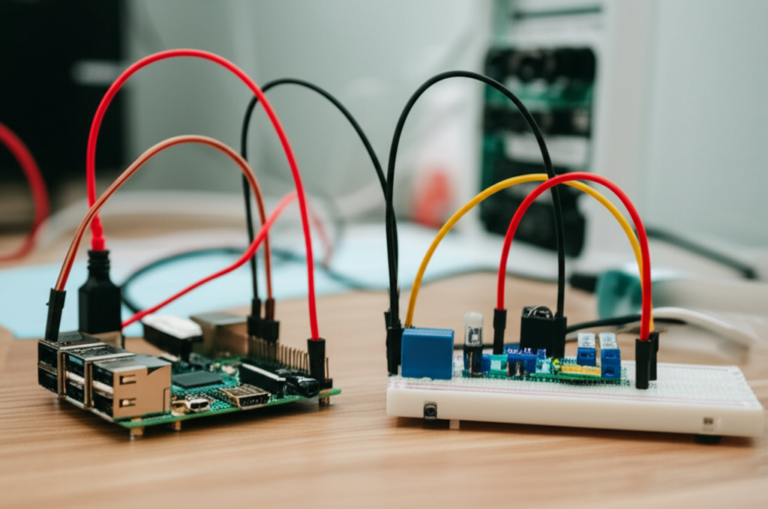
The Raspberry Pi is the industry standard for DIY home automation.
- Pros: Low power consumption, massive community support, runs Home Assistant OS natively, cheap.
- Cons: SD cards can fail (use a high-quality one or a USB boot), limited RAM on older models.
Recommended Hardware
- Raspberry Pi 4 (4GB or 8GB): The sweet spot. Plenty of power for Home Assistant, Node-RED, and a database.
- Raspberry Pi 5: The new beast. Faster, but requires a specific power supply and active cooling for heavy loads.
- Alternative: Home Assistant Yellow (a pre-built Pi-based board with built-in Zigbee/Z-Wave) or a NVIDIA Jetson for heavy AI tasks.
Software: Home Assistant
Home Assistant is the open-source software that ties it all together.
- Local Control: No cloud required.
- Integrations: Supports over 2,0 devices.
- Dashboards: Create beautiful, custom interfaces for your phone or wall tablet.
For more on getting started with the hardware, check out our guide on DIY Electronics and IoT Development.
📡 Communication Protocols Decoded: Zigbee, Z-Wave, Wi-Fi, and Matter
This is where most people get confused. You have four main languages your devices can speak.
1. Wi-Fi
- Best for: High-bandwidth devices (cameras, speakers) and simple plugs.
- Pros: No extra hub needed, easy setup.
- Cons: Drains battery quickly, clogs your network, requires internet for some features.
- Brands: TP-Link Kasa, Shelly, Meross.
2. Zigbee
- Best for: Sensors, bulbs, and battery devices.
- Pros: Low power, creates a mesh network (each device repeats the signal), fast response.
- Cons: Requires a Zigbee coordinator (USB stick).
- Brands: Philips Hue, Aqara, IKEA Tradfri, Sonoff.
3. Z-Wave
- Best for: Critical infrastructure (locks, switches, relays).
- Pros: Extremely reliable, long-range, interoperable (all Z-Wave devices work together), secure.
- Cons: More expensive, requires a Z-Wave controller.
- Brands: Aeotec, Zooz, Fibaro, Shelly Wave.
4. Matter (and Thread)
- Best for: The future. A universal standard.
- Pros: Works across Apple, Google, Amazon, and Samsung ecosystems.
- Cons: Still maturing, not all devices support it yet.
- Note: Matter often runs over Thread, a low-power mesh protocol.
Comparison Table:
| Feature | Wi-Fi | Zigbee | Z-Wave | Matter/Thread |
|---|---|---|---|---|
| Power Usage | High | Low | Very Low | Very Low |
| Range | Medium | Medium (Mesh) | Long (Mesh) | Medium (Mesh) |
| Hub Required | No | Yes | Yes | Yes (Border Router) |
| Interoperability | Low | Medium | High | Universal |
| Cost | Low | Low | High | Medium |
🔌 Smart Devices Deep Dive: Sensors, Switches, and Actuators
Let’s get specific. What should you actually buy?
Sensors
- Aeotec MultiSensor 7: The Swiss Army Knife. Motion, temp, humidity, light, UV, vibration. Battery or USB powered.
- Aqara Motion Sensor: Cheap, reliable, and works great with Zigbee.
- Shelly Door/Window 2: Wi-Fi based, no hub needed, very thin.
Switches & Relays
- Shelly 1PM: A Wi-Fi relay that fits behind a standard switch. Great for “smart bulb mode” (where you keep your physical switch).
- Zooz ZEN21: A Z-Wave switch that handles high loads and has a neutral wire requirement (common in US homes).
- Third Reality Smart Switch: A Matter-over-Thread switch that is incredibly easy to install and works with multi-gang setups.
Actuators (Things that move)
- Smart Blinds: SwitchBot Curtain or IKEA Fyrtur for automated window coverings.
- Smart Valves: Shelly Valve to shut off water automatically if a leak is detected.
👉 CHECK PRICE on:
- Shelly 1PM: Amazon | Shelly Official
- Aeotec MultiSensor 7: Amazon | Aeotec Official
- Zooz ZEN21: Amazon | Zooz Official
🏗️ Building the Hardware: Enclosures, Wiring, and Power Management
You have the brain and the sensors. Now, how do you build the body?
Enclosures
Never leave electronics exposed.
- Indoor: Use standard junction boxes (plastic or metal) rated for your region.
- Outdoor: Use IP65 or IP67 rated enclosures. Brands like Hamond or Polycase make great options.
- Raspberry Pi: Use a case with active cooling (fan) if you are running heavy loads.
Wiring Best Practices
- Color Coding: Always follow local codes (e.g., Black=Hot, White=Neutral, Green=Ground).
- Wire Nuts vs. Wago: We prefer Wago connectors for DIY. They are reusable, secure, and easier to work with than twisting wire nuts.
- Labeling: Label every wire! You will thank yourself in 6 months.
Power Management
- UPS (Uninterruptible Power Supply): If your house loses power, your smart home should stay online. Get a small UPS for your Raspberry Pi and router.
- Power over Ethernet (PoE): For cameras and some sensors, PoE is a game-changer. No batteries, no extra power bricks.
🚀 Top 15 Essential DIY Home Automation Projects for Beginners to Pros
Ready to build? Here are 15 projects ranked by difficulty, inspired by the “first YouTube video” perspective and our own engineering experience.
- Smart Light Switch Replacement: Replace a dumb switch with a smart one (Shelly or Z-Wave).
- Motion-Activated Hallway Light: Use a Zigbee sensor to turn on a light when you walk in.
- Smart Plug Schedule: Set a lamp to turn on at sunset.
- Door/Window Alert: Get a notification when the front door opens.
- Temperature Monitoring: Track room temps and get alerts if it gets too hot/cold.
- Automatic Blinds: Open blinds at sunrise, close at sunset.
- Laundry Notification: Use a vibration sensor on the washing machine to alert you when the cycle is done.
- Smart Garden: Monitor soil moisture and auto-water plants.
- Vacation Mode: Simulate presence by randomly turning lights on/off.
- Energy Dashboard: Visualize your home’s energy usage in real-time.
- Voice-Controled Scenes: “Hey Google, Movie Time” dims lights and lowers blinds.
- Smart Lock Auto-Lock: Lock the door automatically when you leave.
- Water Leak Shut-off: Connect a water sensor to a smart valve to stop water flow.
- Air Quality Control: Trigger an air purifier when CO2 levels rise.
- Full Home Energy Management: Integrate solar panels, battery storage, and EV charging.
🤖 Integrating Voice Assistants: Alexa, Google Home, and Siri Shortcuts
You built the brain, but you need a voice.
- Alexa: Great for general commands and shopping. Use Home Assistant Cloud (paid) or LocalTuya to connect.
- Google Home: Excellent for natural language processing and routines.
- Siri/HomeKit: Apple users love the privacy. Use Home Assistant with the HomeKit Bridge integration to expose devices to Apple Home.
Pro Tip: Don’t rely solely on voice. Voice is great for “On/Off,” but automations handle the “If/Then” logic silently.
🔒 Privacy and Security: Protecting Your Smart Home from Hackers
A smart home is only as secure as its weakest link.
- Network Segmentation: Put your IoT devices on a Guest Network or a separate VLAN. This prevents a hacked smart bulb from accessing your laptop.
- Strong Passwords: Change default passwords on everything. Use a password manager.
- Two-Factor Authentication (2FA): Enable 2FA on your Home Assistant account and cloud services.
- Updates: Keep your firmware and software updated.
- Local vs. Cloud: As mentioned, local control (Home Assistant) reduces the attack surface significantly.
🛠️ Troubleshooting Common DIY Smart Home Glitches
Even the best systems have hiccups.
- Device Offline: Check the battery, check the Wi-Fi signal, or restart the hub.
- Latency: If a light takes 5 seconds to turn on, check your network congestion or switch to Zigbee/Z-Wave.
- Automation Not Triggering: Check the logs in Home Assistant. Did the sensor report the event? Is the condition met?
- Wi-Fi Congestion: If you have 50+ devices, your router might be choking. Upgrade to a Mesh Wi-Fi system (like Eero or Ubiquiti) and ensure 2.4 GHz is optimized.
📈 Future-Proofing Your Setup: Upgrading to Matter and Thread
The landscape is changing. Matter is the new standard.
- What to do now: Buy devices that support Matter or Thread.
- Migration: You can run Home Assistant alongside Matter. It acts as a Matter Controller.
- Thread Border Router: Your Raspberry Pi (with a Thread dongle) or a newer smart speaker can act as a Thread Border Router, connecting Thread devices to your network.
Don’t panic if you have old Zigbee devices; they will still work. But for new purchases, look for the Matter logo.
💡 Quick Tips and Facts
Wait, we said were done with tips? Not quite. Here are a few more pro secrets you might have missed:
- The “Blue Light” Hack: Use smart bulbs to shift to warm, dim red light in the evening to improve sleep quality.
- NFC Tags: Stick cheap NFC tags on your nightstand. Tap your phone to it to trigger “Goodnight” mode.
- Backup Your Config: Home Assistant has a built-in backup feature. Do it weekly. If your SD card dies, you don’t want to rebuild from scratch.
- Community is Key: The Home Assistant Community Forum is a goldmine. If you have a problem, someone else has solved it.
🏆 Conclusion

Building a DIY home automation system is a journey, not a destination. It starts with a single smart plug and evolves into a fully integrated, intelligent ecosystem that anticipates your needs.
The Verdict:
- Positives: Unmatched flexibility, privacy, cost savings, and the sheer joy of building something that works exactly how you want it.
- Negatives: Initial learning curve, time investment, and the occasional troubleshooting headache.
Our Recommendation:
If you are serious about a smart home that lasts, skip the proprietary ecosystems. Start with a Raspberry Pi 4, install Home Assistant, and build your network around Zigbee and Z-Wave for reliability. Use Matter for new devices. And remember, safety first—if you aren’t comfortable with electricity, hire a pro for the hardwired parts.
You don’t need to be a coding wizard to automate your home. You just need curiosity, a plan, and the right tools. Welcome to the future of living.
🔗 Recommended Links
Essential Hardware
- Raspberry Pi 4/5: Amazon | Raspberry Pi Official
- Home Assistant Yellow: Amazon | Home Assistant Official
- Aeotec Z-Stick 7 Plus: Amazon | Aeotec Official
- SONOFF Zigbee 3.0 USB Dongle: Amazon | SONOFF Official
- Shelly 1PM: Amazon | Shelly Official
- Aqara Sensors: Amazon | Aqara Official
Books & Resources
- “Home Assistant: The Ultimate Guide” (Amazon): Search Results
- “Raspberry Pi Projects for the Evil Genius” (Amazon): Search Results
❓ FAQ

What are the beginner-friendly Raspberry Pi kits for home automation?
For beginners, the Raspberry Pi 4 Starter Kit (which includes the board, case, power supply, and SD card) is the best starting point. It provides everything you need to install Home Assistant OS without hunting for individual components.
Read more about “What Are Raspberry Pi Pico W Good For? 7 Surprising Uses in 2026 🚀”
How do I set up a Raspberry Pi smart home security system?
You can set up a security system by connecting Zigbee or Z-Wave door/window sensors and motion detectors to your Raspberry Pi running Home Assistant. For cameras, you can use Reolink or Amcrest cameras and integrate them via Frigate (an AI-based NVR) running on the same Pi or a separate NAS.
Read more about “🐧 Ultimate Guide to Linux Operating Systems: 20+ Distros Reviewed (2026)”
What programming languages are best for Raspberry Pi home automation?
While Python is the native language of the Raspberry Pi and is excellent for custom scripts, most users don’t need to code. Home Assistant uses a YAML-based configuration or a visual editor. For advanced logic, Node-RED (a flow-based programming tool) is highly recommended and uses a visual interface.
Read more about “🚀 8 Must-Try Raspberry Pi Projects for 2026: Dive Into WhyPi!”
Can I control home appliances remotely with a Raspberry Pi?
Yes! By using smart plugs (like Shelly or TP-Link Kasa) or relays (like Shelly 1PM) connected to your Raspberry Pi, you can control any appliance remotely via the Home Assistant app, even when you are away from home.
Read more about “16+ SBC Wonders: Your 2026 Guide! 🚀”
What sensors are needed for DIY home automation with Raspberry Pi?
The essentials include temperature/humidity sensors (like the DHT2 or Aeotec MultiSensor), motion sensors (PIR), and door/window contact sensors. For advanced setups, consider water leak sensors and air quality monitors.
Read more about “🚀 Microcontroller Programming: The Ultimate 2026 Guide to Building Smart Devices”
How can I use Raspberry Pi to automate my home lighting system?
You can automate lighting by replacing traditional switches with smart switches (Z-Wave or Wi-Fi) or by using smart bulbs (Zigbee). Connect these to Home Assistant on your Raspberry Pi and create automations based on time, motion, or presence.
Read more about “Ultimate Raspberry Pi Retro Gaming Emulation Guide (2026) 🎮”
What are the best DIY home automation projects using Raspberry Pi?
Top projects include automated lighting, smart thermostat control, home security monitoring, energy usage tracking, and smart garden irrigation. These projects offer a great balance of utility and learning.
Read more about “🐧 Is Raspberry Pi Linux or Python? The 2026 Truth Revealed!”
What is the best Raspberry Pi model for home automation?
The Raspberry Pi 4 (4GB or 8GB) is currently the best balance of performance and cost. The Raspberry Pi 5 is faster but requires more power and cooling. For a plug-and-play experience, the Home Assistant Yellow board is an excellent choice.
Read more about “Where Can I Buy a Raspberry Pi Pico? 7 Top Spots & Prices (2026) 🛒”
How do I set up Home Assistant on Raspberry Pi?
Download the Home Assistant OS image, flash it to a high-quality SD card (or USB drive) using BalenaEtcher, insert it into the Pi, and power it on. Access the setup wizard via your web browser at http://homeassistant.local.
Read more about “🚀 15 Best Raspberry Pi Projects to Try in 2026”
Can I use Raspberry Pi to control smart lights without a hub?
Yes, if you use Wi-Fi or Matter devices that connect directly to your network. However, for Zigbee or Z-Wave devices, you need a USB dongle (like the SONOFF Zigbee stick) plugged into the Raspberry Pi to act as the hub.
Read more about “What Operating Systems Are Compatible with Raspberry Pi? 🖥️ (2026)”
What sensors work best with DIY home automation projects?
Aeotec MultiSensor 7 (Z-Wave) and Aqara sensors (Zigbee) are top choices due to their reliability, battery life, and multi-function capabilities (motion, temp, light, etc.).
Read more about “🤖 15 Best Robotics Kits for Beginners (2026): Build Your Future!”
Is Raspberry Pi reliable for 24/7 home automation?
Yes, the Raspberry Pi is designed for 24/7 operation. To ensure reliability, use a high-quality SD card (or boot from USB/SSD), a good power supply, and a case with cooling. Regular backups are also essential.
Read more about “How Can I Use Raspberry Pi for Home Automation? 10 Must-Try Ideas (2026) 🤖”
How much does it cost to build a Raspberry Pi smart home system?
A basic setup (Pi 4, case, SD card, Zigbee/Z-Wave stick) costs around $10-$150. Adding sensors and switches will increase the cost, but you can start small with just a few devices for under $50.
Read more about “Can I Use Raspberry Pi Pico as a PC? The Surprising Truth! 🖥️ (2026)”
What are the easiest DIY home automation projects for beginners?
Start with smart plugs to automate lamps or coffee makers, or replace a single light switch with a smart switch. These projects require minimal wiring and offer immediate gratification.
Read more about “🤖 10+ Top Raspberry Pi DIY Uses for Protyping (2026)”
📚 Reference Links
- Home Assistant Documentation: https://www.home-assistant.io/
- Raspberry Pi Official Site: https://www.raspberrypi.com/
- Z-Wave Alliance: https://z-wavealliance.org/
- Zigbee Alliance: https://csa-iot.org/
- Matter Standard: https://buildwithmatter.com/
- VueVille: How we built our DIY Smart Home Automation System: https://www.vueville.com/blog/built-diy-home-automation-system/
- Shelly Official Website: https://shelly.cloud/
- Aeotec Official Website: https://aeotec.com/
- Zooz Official Website: https://getzooz.com/
- Why Pi™: Electronics Industry News: https://www.whypi.org/category/electronics-industry-news/
- Why Pi™: IoT Development: https://www.whypi.org/category/iot-development/
- Why Pi™: Electronic Component Reviews: https://www.whypi.org/category/electronic-component-reviews/
- Why Pi™: DIY Electronics: https://www.whypi.org/category/diy-electronics/